












Expeditions are one of the most unique systems in Arc Raiders. They act like a voluntary “soft-wipe” that lets you send off your Raider, reset most of your progression, and start fresh — but with some important things preserved. Players use Expeditions to refresh their gameplay loop, test new builds, and gain long-term account benefits. But the system can also be confusing, especially if you’re unsure what you lose and what is safe to carry into the next run.
Quick Facts at a Glance
- Expeditions unlock at Level 20.
- They are voluntary. A reset never happens unless you trigger it.
- An Expedition requires building a caravan under the Projects menu.
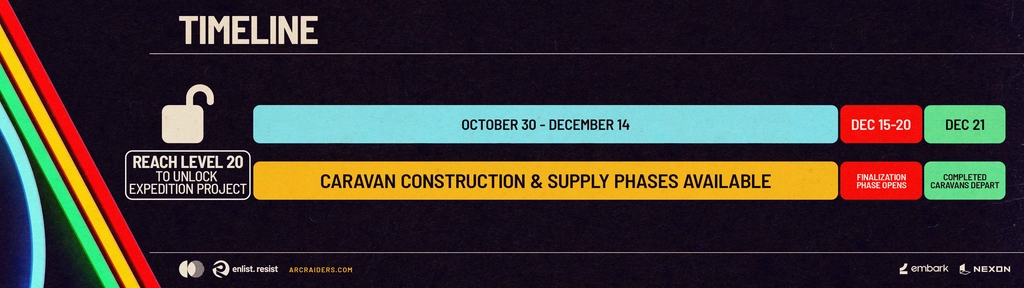
- A full cycle lasts roughly 60 days of preparation + a 7-day departure window.
- You keep cosmetics, account unlocks, codex entries, and Expedition-earned bonuses.
- You lose: gear, level, crafting progress, stash upgrades, blueprints, coins, and most inventory.
- If you miss the departure window, your caravan stays built. Nothing is lost — you just wait for the next cycle.
- Expeditions act like a “prestige system,” giving long-term benefits for future playthroughs.
What Is an Expedition?
An Expedition in Arc Raiders is a repeatable account-level project that lets you “send” a Raider away and effectively start a new one. The system works like a soft wipe: you voluntarily reset character-specific progress while keeping things tied to your overall account.
You activate it through Projects → Expedition Project in your base. When you commit to the Expedition, you begin contributing materials to build a caravan. Once it’s complete and the departure window opens, you can retire the current Raider.
The idea behind Expeditions is simple:
- Let players restart without losing all their hard-earned work.
- Preserve long-term achievements, cosmetics, and meta-progression.
- Create a replayable loop for players who enjoy fresh starts.
- Avoid forced wipes and give full control to the player.
Think of it as Arc Raiders’ version of a prestige system — but with more strategic decisions and meaningful tradeoffs.
How the Expedition Cycle Works
An Expedition cycle has several phases. Understanding the timeline helps you decide when to start and how to prepare.
1. Preparation Phase (~60 Days)
This is the main chunk of the cycle. You gather the required materials and contribute them to build and supply your caravan.
During this period, nothing resets. You’re still playing normally and just preparing the Expedition project.
2. Finalization Phase
Once the necessary materials are delivered, the caravan becomes “ready.” At this point, you wait for the next departure window.
3. Departure Window (7 Days)
This is a fixed window at the end of the cycle when you can actually send your Raider on the Expedition.
If you miss this window, don’t worry:
- You don’t lose your materials.
- Your caravan stays built.
- You simply join the next cycle’s departure window.
4. Post-Departure
Once you confirm the Expedition, your Raider is retired, progression is reset according to the rules, and you begin a fresh run with the preserved benefits.
How to Start an Expedition — Requirements
You can access Expeditions once your Raider reaches Level 20. After hitting this milestone, open the Projects menu and locate the Expedition Project. This section contains the full overview of the caravan you must build before the departure window.
To begin the process, enter the Expedition Project and check the required resources. The game will show the total amount of materials you need to collect and deliver. Once you understand what is needed, simply keep playing as usual and bring the materials back gradually. When all contributions are complete and the caravan is fully prepared, it will enter a standby state that lasts until the official seven-day departure window arrives. During that window, you will be able to finalize your Expedition and send your Raider away. If you miss the window, nothing is lost — the caravan remains ready for the next cycle.
The materials required for the caravan usually include a mix of metal parts, rubber, electronics, Arc Alloy, provisions, and other generic crafting components. Certain currency amounts may also be part of the requirements. The exact set of materials can change depending on the cycle or patch, but all of them are obtained naturally through regular gameplay activities such as looting, defeating ARC machines, scavenging locations, or completing missions.
What You Keep vs. What Resets
This is the most important part of the Expedition system. Many players hesitate to send their Raider because they are afraid of losing too much. Below is the most accurate and simplified breakdown.
What You KEEP (Persists After Expedition)
| Category | Explanation | Player Benefit |
|---|---|---|
| Cosmetics | Skins, outfits, emotes, weapon skins — anything purely cosmetic is safe. | Allows your new Raider to retain a personalized look and style immediately. |
| Codex Entries | Lore, intel, discovered entries, and similar meta-progression. | Keeps story progress and reference information accessible for new runs. |
| Account Unlocks | Maps, base stations, and features unlocked at the account level. | Lets you start the next Expedition with previously unlocked locations and facilities ready to use. |
| Meta-Progression Bonuses | Rewards from finishing Expeditions, such as stash expansions or other long-term account perks (depends on the cycle). | Provides ongoing advantages, making future gameplay smoother and more efficient. |
| Expedition History | Previously completed Expeditions and their cumulative rewards. | Shows your achievements and contributes to legacy or cumulative bonuses across cycles. |
What RESETS (You Lose When the Expedition Triggers)
| Category | Explanation | Player Impact |
|---|---|---|
| Inventory Items | Gear, weapons, loot, consumables — including rare drops. | You must farm or craft these items again in the new run, which slows early progression. |
| Blueprints | Weapon and equipment blueprints must be found again. | Limits your access to advanced gear until you reacquire blueprints. |
| Coins / Creds | Currency resets with your Raider. | Spending power and ability to buy resources or upgrades starts from zero. |
| Player Level | You return to the starting point; XP and level progress are lost. | All abilities and unlocked character features tied to level must be rebuilt. |
| Skill Points | All skills tied to the Raider are reset. | You need to reassign points and recreate your preferred skill setup. |
| Workshop Progress | Upgrades, crafted modules, and crafting paths tied to the Raider. | Any crafting advantages are lost; early-game efficiency is reduced. |
| Stash Upgrades | Stash and workshop expansions tied to the character. | Storage limitations require careful planning for resource management. |
| Quest Progress | Mission lines, completed tasks, and quest unlocks. | Story or side mission progress starts over; repeated effort is required. |
Why Expeditions Exist — Developer Intent
The idea behind Expeditions is to strike a balance between:
- long-term progression
- fairness
- replayability
- personal control
By making the reset voluntary, Arc Raiders avoids the frustration of forced wipes often seen in live-service or survival games. At the same time, it gives players a meaningful reason to replay early game content with added bonuses.
Expeditions also let developers add seasonal themes, changing objectives, and evolving rewards without affecting players who don’t want to reset.
Is an Expedition Worth It?
Whether an Expedition is worth it depends on your personal playstyle in Arc Raiders. Some players enjoy starting fresh because rebuilding from scratch can be fun when you already understand the systems. Expeditions also provide long-term account bonuses, as each completed run may grant rewards that permanently improve your account. If your current build has become boring or repetitive, sending your Raider on an Expedition lets you experiment with new weapons, strategies, and approaches. Additionally, if your Raider is in a messy state, perhaps having upgrades or items that no longer fit your playstyle, the reset can serve as a clean slate. Many players also appreciate the seasonal rhythm that Expeditions create, providing structured cycles of progression and replay.
On the other hand, there are reasons to delay or skip an Expedition. If you have recently obtained rare gear or blueprints, sending your Raider away would mean losing these valuable items. Players who do not have much time to play may find rebuilding progression to be a frustrating grind. Strongly upgraded stash and workshop setups are also lost, which can impact efficiency early in a new run. Finally, if you are in the middle of quest chains, Expedition resets will erase all mission progress, requiring you to repeat them in the new run.
In simple terms, if you are heavily invested in your current build and gear, it is better to wait. However, if you want a clean slate and the opportunity to earn permanent account bonuses, an Expedition can be a rewarding and enjoyable choice.
Best Time to Start an Expedition
Here’s when most players choose to trigger the reset:
- Early in a patch or cycle. You’ll have the full ~60 days to gather materials.
- Right after finishing major goals. If you’ve completed your story missions or tried every weapon you wanted, it’s a natural breakpoint.
- When you feel stuck or bored. A fresh run can change the entire game dynamic.
- When chasing long-term bonuses. If you plan to complete multiple Expeditions over months, starting early helps you stack rewards.
Should You Do an Expedition?
Expeditions in Arc Raiders are designed for players who want a controlled reset that preserves their long-term progress. They are flexible, optional, and meaningful without being punishing. You might consider doing an Expedition if you enjoy replaying early game content, if you are aiming for long-term account bonuses, or if you want a fresh start to experiment with new weapons and strategies. It can also be appealing between content patches or when you want to follow the structured seasonal rhythm that Expeditions create.
On the other hand, you may want to wait if you possess rare gear that you are not ready to lose, if you are heavily invested in crafting progress, or if you prefer uninterrupted progression without restarting. Ultimately, the Expedition system allows players to shape their own experience. Whether you choose to reset or continue your current journey, you remain in full control of your account and gameplay decisions.
